Saturday, October 23, 2021

Understanding the Functions of a Computer Card Reader: Types and Functions


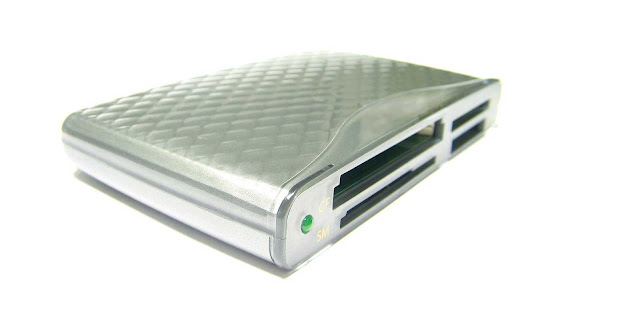
Computer Card Reader

Computer card readers are essential accessories for individuals who need to transfer or access data from memory cards on their computers. In this guide, we'll explore what a computer card reader is, its functions, and how it works.

What is a Computer Card Reader?

A computer card reader is a device that enables the user to read and transfer data from a memory card to a computer or other electronic device. It consists of a slot where the user inserts the memory card, and the data is then transferred to the computer.

Types of Computer Card Readers

There are different types of computer card readers that are available on the market. Some of the most common types include:

  1. USB Card Readers: These types of card readers connect to a USB port on your computer and are used to read and transfer data from memory cards.

  2. Internal Card Readers: These are built into your computer and are typically found on the front of your computer. They are designed to read various types of memory cards, including SD cards, MMC cards, and others.

Functions of a Computer Card Reader

The primary function of a computer card reader is to transfer data from a memory card to a computer or other electronic device. Here are some other functions of a computer card reader:

  1. Backup Data: A computer card reader can be used to back up data from memory cards. This is particularly useful when you need to store large amounts of data.

  2. Share Data: Card readers make it easy to share data between devices. You can use them to transfer data from one device to another, such as transferring photos from a camera to a computer.

  3. Secure Data: Some card readers come with encryption software, which allows you to protect your data and prevent unauthorized access.

How Does a Computer Card Reader Work?

Computer card readers work by reading the data stored on a memory card and transferring it to a computer or other electronic device. When the user inserts the memory card into the card reader, the card reader reads the data on the card and converts it into a format that can be read by the computer.

Once the data is converted, it can be transferred to the computer using a USB or other type of cable. The user can then access the data on the computer and use it as needed.

Conclusion

Computer card readers are essential tools for individuals who need to transfer data from memory cards to computers. They are easy to use, reliable, and come in various types to suit different needs. Whether you need to back up data, share data, or secure data, a computer card reader is a versatile accessory that you can't do without. With the right card reader, transferring data from memory cards to computers has never been easier.






                           Previous Webcam Next Usb Flash Drive


----------------------------------------------------------------------------------Floppy Disk| Scanner| Speaker|CD/DVD|Monitor|Keyboard| Different parts of a computer|Usb Flash Drive| Webcam|Card Reader|Mouse


Everything You Need to Know About Computer Webcams: Features and Functions


Computer Webcam

Are you in need of a computer webcam? Whether you're working remotely, attending virtual meetings, or streaming content, a webcam is an essential accessory for your computer. In this article, we'll dive into what a computer webcam is, and explore its key functions and features to help you make an informed purchasing decision.

What is a Computer Webcam?

A computer webcam is a small camera that connects to your computer, allowing you to capture video and images. It's typically built into the top of a computer screen, or can be attached externally via USB. Webcams come in various sizes and shapes, and offer a wide range of features to enhance your video calling and streaming experiences.

Functions of a Computer Webcam:

  1. Video Calling: One of the primary functions of a computer webcam is video calling. Whether you're communicating with colleagues, friends, or family members, a webcam provides a face-to-face experience. With high-definition resolution and built-in microphones, webcams make video calls feel more personal and engaging.

  2. Live Streaming: Webcams are also great for live streaming. Whether you're broadcasting a gaming session, hosting a webinar, or streaming a live event, a high-quality webcam is essential for producing professional-looking content. Look for webcams with features like auto-focus, low-light correction, and high frame rates to ensure optimal video quality.

  3. Security: Webcams can also be used for security purposes. You can set up your webcam to monitor your home or office while you're away, using software to alert you if any movement is detected. Look for webcams with motion detection and remote access features for added security.

Features to Consider:

  1. Resolution: Resolution is a key consideration when shopping for a webcam. Look for webcams with at least 1080p resolution for optimal video quality.

  2. Frame Rate: Frame rate is also important for live streaming and video calling. Look for webcams with at least 30 frames per second (fps) for a smooth, seamless experience.

  3. Auto-Focus: Auto-focus is a useful feature that ensures that your image is always sharp and clear, even if you move around.

  4. Low-Light Correction: If you plan to use your webcam in low-light conditions, look for webcams with low-light correction features to ensure that your image is always bright and clear.

  5. Built-in Microphones: Look for webcams with built-in microphones for optimal audio quality. This is especially important if you plan to use your webcam for video calling.

Conclusion:

A computer webcam is a must-have accessory for anyone who wants to enhance their video calling, streaming, or security experience. By choosing a webcam with the right features, you can produce professional-looking content, stay connected with loved ones, and keep your home or office secure. Consider the features and functions discussed in this article to make an informed purchasing decision.


                          Previous Monitor Next Card Reader


----------------------------------------------------------------------------------Floppy Disk| Scanner| Speaker|CD/DVD|Monitor|Keyboard| Different parts of a computer|Usb Flash Drive| Webcam|Card Reader|Mouse


Friday, August 13, 2021

A Guide to Computer Monitors: Types and Functions


Computer monitor


As we spend more and more time in front of our computers, having a high-quality monitor is essential.

A computer monitor: Is an output device that displays visual information from a computer. It is a screen that is used to display images, videos, text, and other visual content generated by a computer's graphics card. Computer monitors come in different sizes, resolutions, and types, such as LCD, LED, OLED, and CRT monitors. They are essential for any computing task, whether it's for work, entertainment, or gaming. The quality and features of a computer monitor can greatly affect the user's experience, making it an important consideration when setting up a computer system.


Types of Computer Monitors:
  1. LCD (Liquid Crystal Display) Monitors: These are the most common types of computer monitors. They are lightweight, consume less power, and offer excellent image quality.

  2. LED (Light Emitting Diode) Monitors: These monitors use LED backlighting, which offers better contrast and brightness than LCD monitors. They also consume less power and are more environmentally friendly.

  3. OLED (Organic Light Emitting Diode) Monitors: These monitors use organic compounds to emit light, resulting in higher contrast ratios and better image quality. They are also more expensive than LCD and LED monitors.

  4. CRT (Cathode Ray Tube) Monitors: These are the oldest types of computer monitors and are rarely used these days. They are bulky, consume a lot of power, and offer poor image quality.

Functions of Computer Monitors:

  1. Display: The primary function of a computer monitor is to display visual information from the computer. This includes everything from text to images and videos.

  2. Resolution: The resolution of a monitor refers to the number of pixels it can display. The higher the resolution, the sharper and clearer the image will be.

  3. Refresh Rate: The refresh rate of a monitor refers to the number of times per second it can refresh the image. A higher refresh rate results in a smoother image and reduces eye strain.

  4. Response Time: The response time of a monitor refers to how quickly it can change from one color to another. A lower response time results in less motion blur and ghosting in fast-paced games and videos.

Conclusion:

Choosing the right computer monitor is crucial for a comfortable and productive computing experience. Understanding the different types of computer monitors and their functions can help you make an informed decision. Consider your needs and budget before making a purchase, and don't forget to check the monitor's compatibility with your computer's graphics card. With the right monitor, you can take your computing experience to the next level.


Previous MouseNext Webcam


----------------------------------------------------------------------------------Floppy Disk| Scanner| Speaker|CD/DVD|Monitor|Keyboard| Different parts of a computer|Usb Flash Drive| Webcam|Card Reader|Mouse


The Ultimate Guide to Computer Mice: Types and Functions


Computer mouse


A computer mouse is an essential input device that helps users navigate and interact with their computers. It is a pointing device that allows users to control the cursor on the screen and perform various functions. In this guide, we'll explore the different types of computer mice and their functions.

Types of Computer Mice:

  1. Mechanical Mouse: This is the oldest type of computer mouse that uses a rubber ball to detect movement. It is rare these days but can still be found in some older computer systems.

  2. Optical Mouse: This type of mouse uses an LED light to detect movement and is more accurate than mechanical mice. It can work on almost any surface, and the lack of moving parts means it requires less maintenance.

  3. Laser Mouse: A laser mouse uses a laser beam to detect movement and offers even greater accuracy than an optical mouse. It is ideal for gaming and other tasks that require precise movements.

  4. Wireless Mouse: A wireless mouse connects to the computer through Bluetooth or a USB receiver and eliminates the need for cables. It provides greater freedom of movement but may require batteries or charging.

Functions of Computer Mice:

  1. Pointing: The primary function of a computer mouse is to move the cursor on the screen and select items.

  2. Scrolling: The scroll wheel on a mouse allows users to scroll through documents, web pages, and other content.

  3. Clicking: Mice have one or more buttons that allow users to click on items and perform various functions such as opening programs, selecting text, or dragging and dropping items.

  4. Customization: Many mice come with additional buttons or features that can be customized to perform specific tasks or shortcuts, making it easier and faster to use certain programs or functions.

Conclusion:

Choosing the right computer mouse can greatly enhance the user's computing experience. Understanding the different types of computer mice and their functions can help users make an informed decision. Consider your needs and preferences before making a purchase, and don't forget to check the mouse's compatibility with your computer system. With the right mouse, you can navigate and interact with your computer more efficiently and comfortably.


Previous KeyboardNext Monitor


----------------------------------------------------------------------------------Floppy Disk| Scanner| Speaker|CD/DVD|Monitor|Keyboard| Different parts of a computer|Usb Flash Drive| Webcam|Card Reader|Mouse


The Comprehensive Guide to Computer Keyboards: Types and Functions


Computer keyboard

A computer keyboard is an essential input device that allows users to communicate with their computers by typing text, commands, and shortcuts. It is a board of keys that are designed to mimic the layout of a traditional typewriter. In this guide, we'll explore the different types of computer keyboards and their functions.

Types of Computer Keyboards:

  1. Membrane Keyboard: This type of keyboard has a thin membrane layer that sits beneath the keys. When a key is pressed, it pushes down on the membrane, completing the circuit and sending a signal to the computer.

  2. Mechanical Keyboard: A mechanical keyboard uses individual switches for each key, resulting in a more tactile and responsive typing experience. It is preferred by gamers and typists who require precision and comfort.

  3. Wireless Keyboard: A wireless keyboard connects to the computer through Bluetooth or a USB receiver and eliminates the need for cables. It provides greater freedom of movement but may require batteries or charging.

  4. Ergonomic Keyboard: An ergonomic keyboard is designed to reduce strain on the wrists and hands by positioning the keys in a more natural and comfortable position. It is ideal for users who type for long periods.

Functions of Computer Keyboards:

  1. Typing: The primary function of a computer keyboard is to allow users to type text, commands, and shortcuts into their computers.

  2. Function Keys: Many keyboards come with function keys that can perform specific tasks or shortcuts, such as adjusting volume, controlling media playback, or launching programs.

  3. Modifier Keys: Modifier keys, such as Shift, Ctrl, and Alt, can be used in combination with other keys to perform various functions or shortcuts.

  4. Numeric Keypad: A numeric keypad is a separate set of keys located on the right side of the keyboard that allows users to enter numbers quickly.

Conclusion:

Choosing the right computer keyboard can greatly improve the user's typing experience and productivity. Understanding the different types of computer keyboards and their functions can help users make an informed decision. Consider your needs and preferences before making a purchase, and don't forget to check the keyboard's compatibility with your computer system. With the right keyboard, you can type comfortably and efficiently, making your computing tasks more enjoyable and productive.


----------------------------------------------------------------------------------Floppy Disk| Scanner| Speaker|CD/DVD|Monitor|Keyboard| Different parts of a computer|Usb Flash Drive| Webcam|Card Reader|Mouse